How a Missing Audience Claim Taught Me More About OIDC Than Any Tutorial
When I started integrating Kubecost Enterprise 3.3 with Keycloak 26.8.0 on OpenShift, I expected a routine OpenID Connect configuration task.
I had a working cluster, a valid OpenShift Route, TLS, a Keycloak client and official documentation. What I did not have was a complete understanding of how many independent steps sit behind a seemingly simple login.
Getting the login to work took me through OAuth 2.0, OpenID Connect, authorization codes, ID Tokens, Access Tokens, audience claims, browser cookies and token introspection. Along the way I added several workarounds to my configuration. When I retested from a clean baseline, most of them turned out to be unnecessary. Working out which fixes were real and which were noise taught me as much as the protocol itself.
TL;DR
- The hacks: During testing, manually appending
redirect_uriandscope=openidto my authentication URL forced the flow forward. However, these were just variables, not root causes.- The clean fix: Configuring exactly one Valid Redirect URI in Keycloak securely handles routing without frontend URL hacks.
- The invisible failure: Even with tokens successfully issued, Kubecost still looped to
/login.- The diagnostic bypass: Setting
skipOnlineTokenValidation: truetemporarily bypassed the loop, proving the issue lived specifically in the online validation path.- The root cause: Keycloak’s token introspection returned
{"active": false}because the access token’s audience (aud) defaulted toaccountrather than the client ID (mykubecostclient).- The permanent solution: An Audience Mapper in Keycloak adds the client ID to the access token’s
audclaim. Introspection succeeds, and the Kubecost configuration becomes simple.
Note: This is a lab environment, with sensitive values replaced by placeholders. Kubecost and Keycloak are the reference implementation, but the failure modes (redirect URIs, scopes, audience claims, token introspection) and the diagnostic workflow apply to any OIDC client, such as Grafana, ArgoCD or Vault.
The Environment
| Component | Configuration |
|---|---|
| Application | Kubecost Enterprise 3.3.0, installed through its operator (Kubecost custom resource) |
| Identity provider | Keycloak 26.8.0, realm demo, confidential client mykubecostclient |
| Platform | OpenShift |
| External access | Edge-terminated OpenShift Route in front of the Kubecost frontend |
| Protocol | OpenID Connect, authorization code flow |
The expected flow:
Browser
   |
   v
OpenShift Route
   |
   v
Kubecost
   |  Redirect to the authorization endpoint
   v
Keycloak
   |  Return an authorization code
   v
Kubecost callback
   |  Exchange code for tokens
   v
Token validation
   |
   v
Authenticated session
Each arrow is a separate step that can fail on its own.
The Initial Configuration
I started with the baseline example from the official Kubecost Keycloak configuration guide:
oidc:
  enabled: true
  clientID: "mykubecostclient"
  clientSecret: "<CLIENT_SECRET>"
  authURL: "https://KEYCLOAK_HOST/realms/REALM/protocol/openid-connect/auth?client_id=mykubecostclient&response_type=code"
  loginRedirectURL: "https://KUBECOST_HOST/oidc/authorize"
  discoveryURL: "https://KEYCLOAK_HOST/realms/REALM/.well-known/openid-configuration"
  skipOnlineTokenValidation: false
Interestingly, this is essentially also the final Kubecost configuration that worked.
The decisive changes were on the Keycloak side:
Add: Valid Redirect URI:
https://KUBECOST_HOST/oidc/authorize

Add: Audience Mapper:
Included Client Audience: mykubecostclient
Add to access token: On
Getting from the initial configuration to understanding why those settings mattered was the interesting part.
Error 1: redirect_uri Was Missing from the Request

We are sorry...
Invalid parameter: redirect_uri
This was confusing because the Kubecost configuration already contained a loginRedirectURL. The browser DevTools Network panel showed what Keycloak had actually received:
Query string parameters:
client_id:     mykubecostclient
response_type: code
There was no redirect_uri on the wire. Keycloak’s event log only showed a generic LOGIN_ERROR (invalid_redirect_uri):

As an experiment, I added the callback explicitly to authURL:
authURL: "https://KEYCLOAK_HOST/.../auth?client_id=mykubecostclient&response_type=code&redirect_uri=https://KUBECOST_HOST/oidc/authorize"On URL-encoding: The OAuth 2.0 spec requires
redirect_urito be percent-encoded when embedded as a query parameter. The examples in this article use the unencoded form for readability.
It looked like the explicit parameter was required. It wasn’t. The real fix was on the Keycloak side, as the next error shows.
Lesson 1: Trust the Traffic, Not the Configuration
A configuration value shows what you intended. A captured request shows what happened. loginRedirectURL in the YAML did not mean redirect_uri was sent to Keycloak, and nothing in the configuration told me so. Only the DevTools Network panel did.
Error 2: The Redirect URI Did Not Match
Even with the parameter in the request, Keycloak rejected it with the same message:
This time it was genuinely confusing. The configuration had been fixed — authURL now included redirect_uri explicitly. And the browser DevTools Network panel confirmed the parameter was present in the actual request:
# Request URL:
# https://KEYCLOAK_HOST/realms/REALM/protocol/openid-connect/auth?client_id=mykubecostclient&response_type=code&redirect_uri=https://KUBECOST_HOST/oidc/authorize

# Query string parameters
client_id:     mykubecostclient
response_type: code
redirect_uri:  https://KUBECOST_HOST/oidc/authorize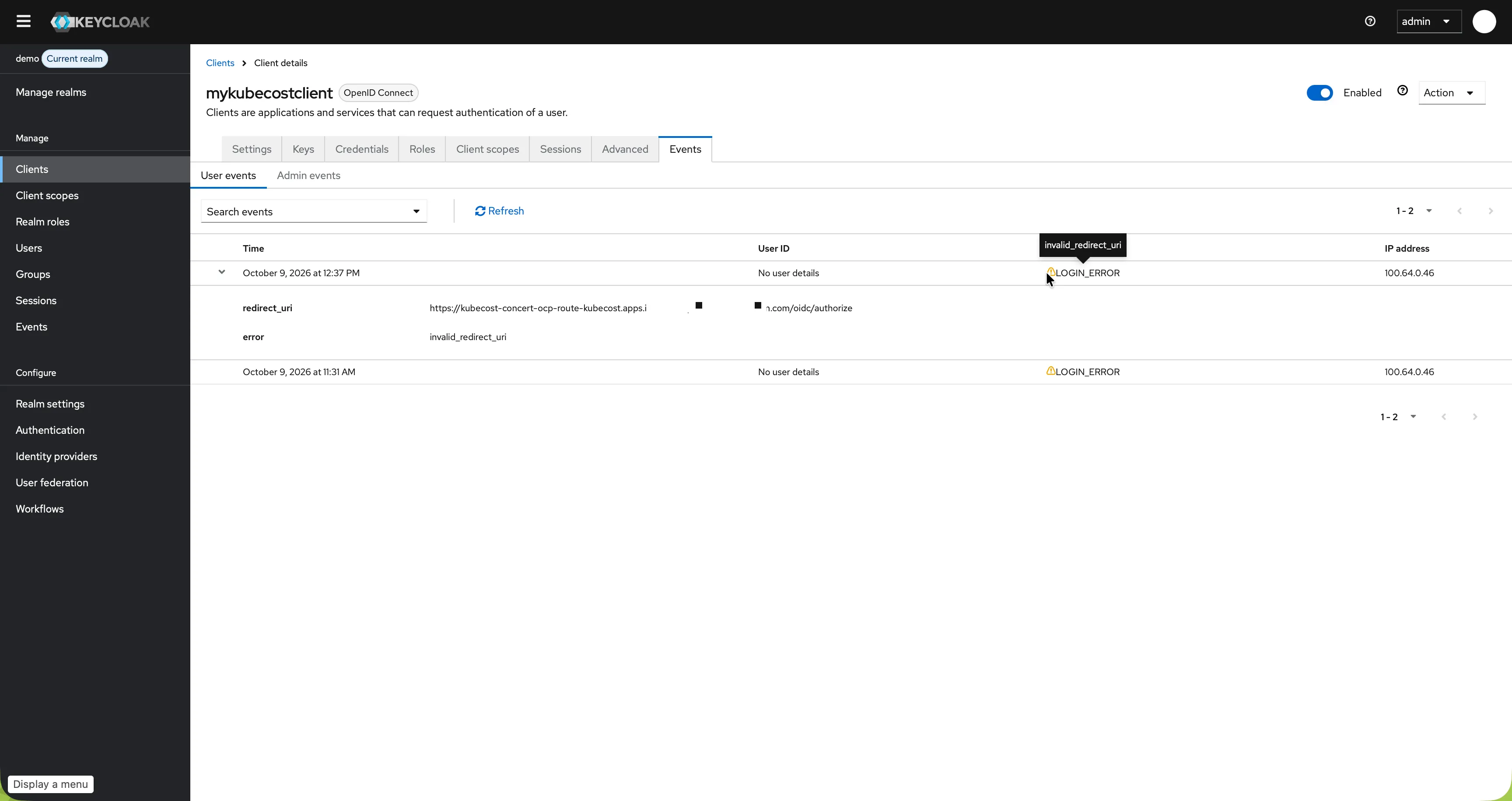
The error meant what it says: the value did not match any redirect URI registered for the client. Keycloak compares exactly. A trailing slash, http instead of https, or a different path is enough to fail.
The fix was in the Keycloak admin console, under Clients → mykubecostclient → Valid redirect URIs:
https://KUBECOST_HOST/oidc/authorize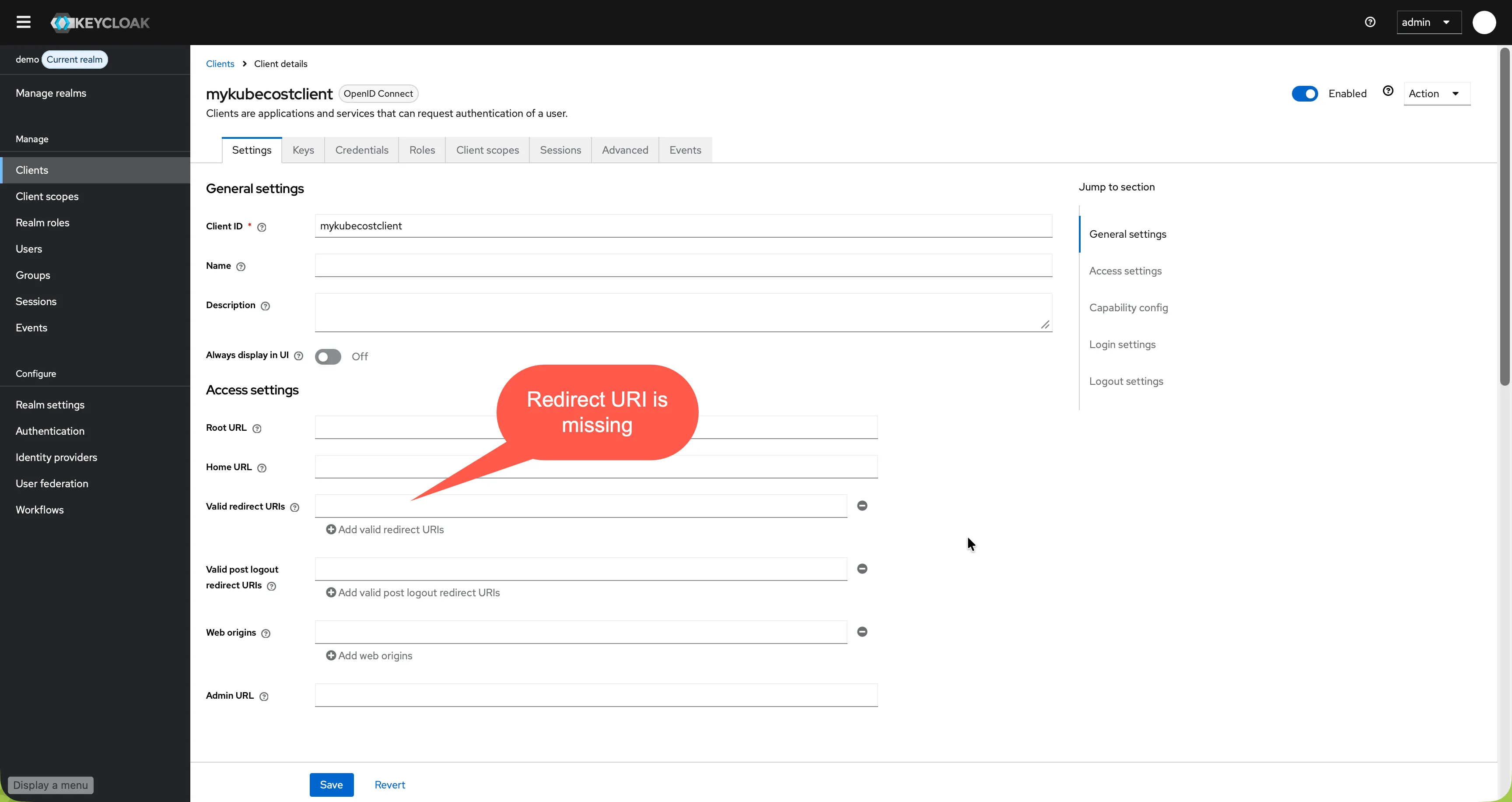
In my final test, configuring exactly one explicit Valid Redirect URI allowed the original Kubecost configuration to work without manually appending redirect_uri to authURL. If no Valid Redirect URIs are configured, multiple URIs/wildcards (
*) exist, or the sent value doesn’t match character-for-character, Keycloak rejects the request withInvalid parameter: redirect_uri. The important lesson is to verify both the effective callback and the redirect URIs registered for the client.
Lesson 2: Redirect URIs Must Match Exactly
When Keycloak rejects a redirect_uri, copy the exact value from the browser DevTools Network panel and register that string verbatim in the Keycloak client. Do not type it manually. A single character difference can be difficult to spot and is sufficient to cause this error.
Error 3: No ID Token Was Issued (scope=openid was missing - OAuth 2.0 vs. OIDC)
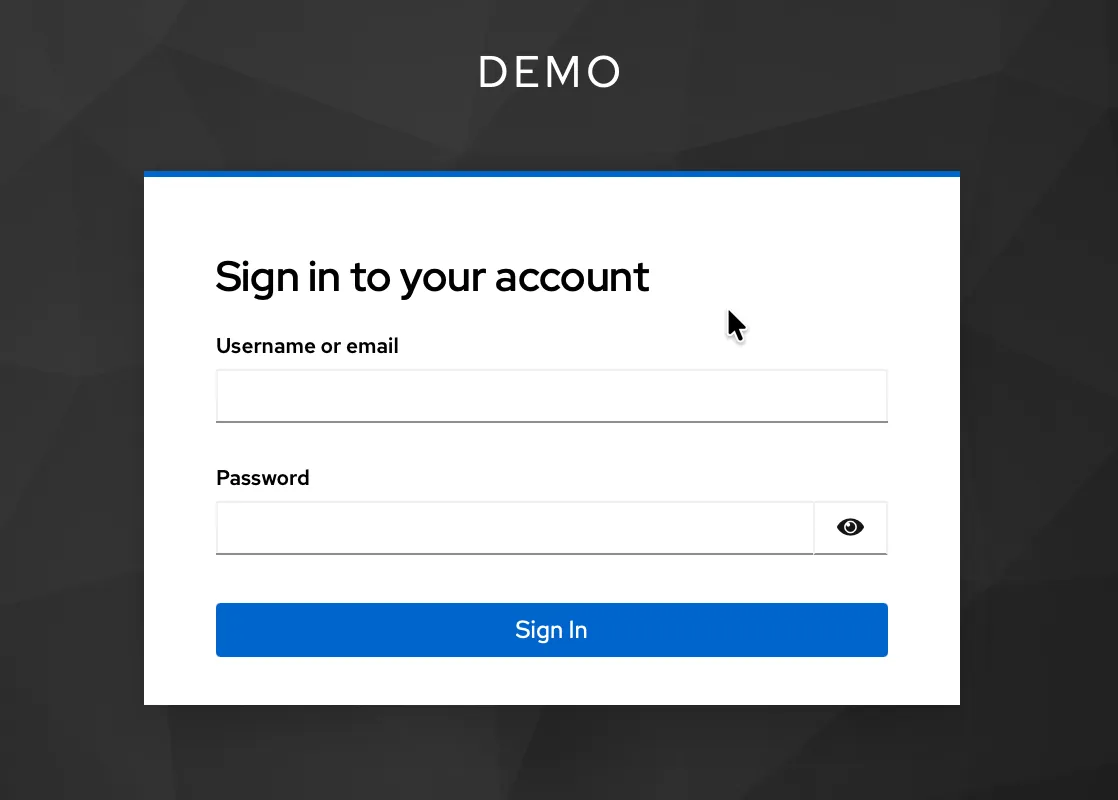
With the redirect URI registered correctly, the Keycloak login page appeared and credentials were accepted:
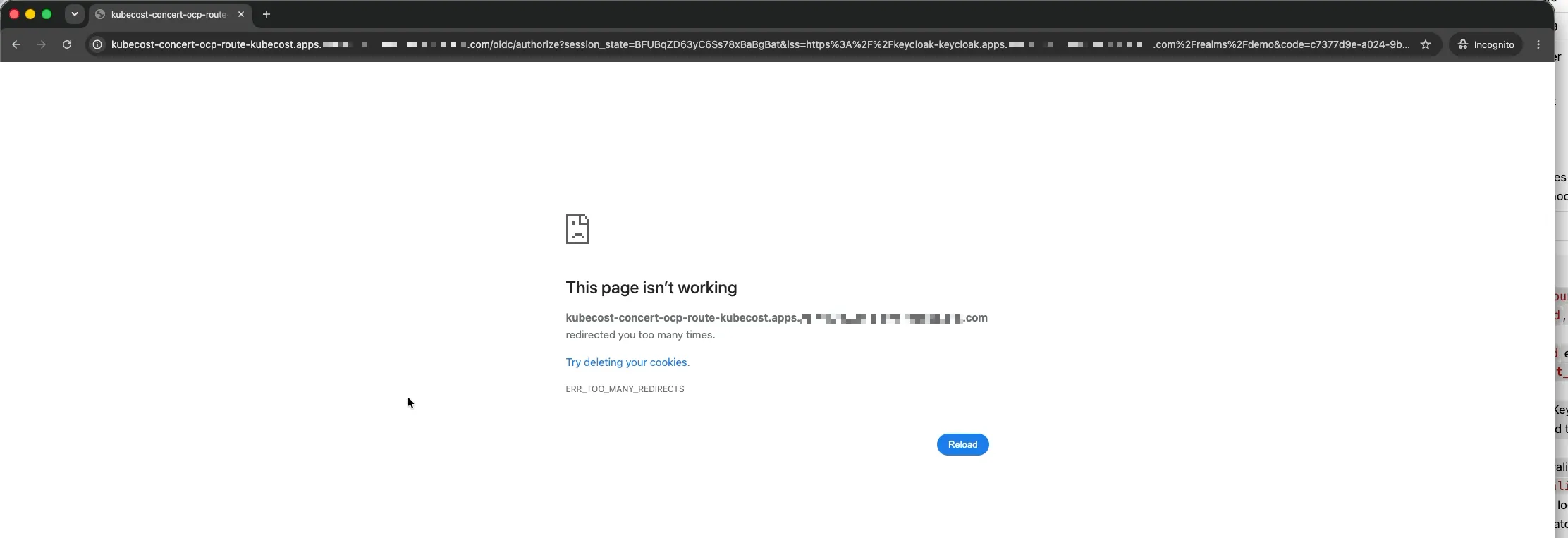
But instead of landing on the Kubecost dashboard, the browser entered an endless redirect loop — Kubecost redirecting back to Keycloak, Keycloak redirecting back to Kubecost, repeatedly, until the browser gave up:
A split second later, before any manual navigation, Kubecost displayed:
Error. Empty OIDC token in response. Please refer to the logs for more details.It sounded like Keycloak was not returning an ID Token. I had no idea why, until I looked at the Keycloak event log.
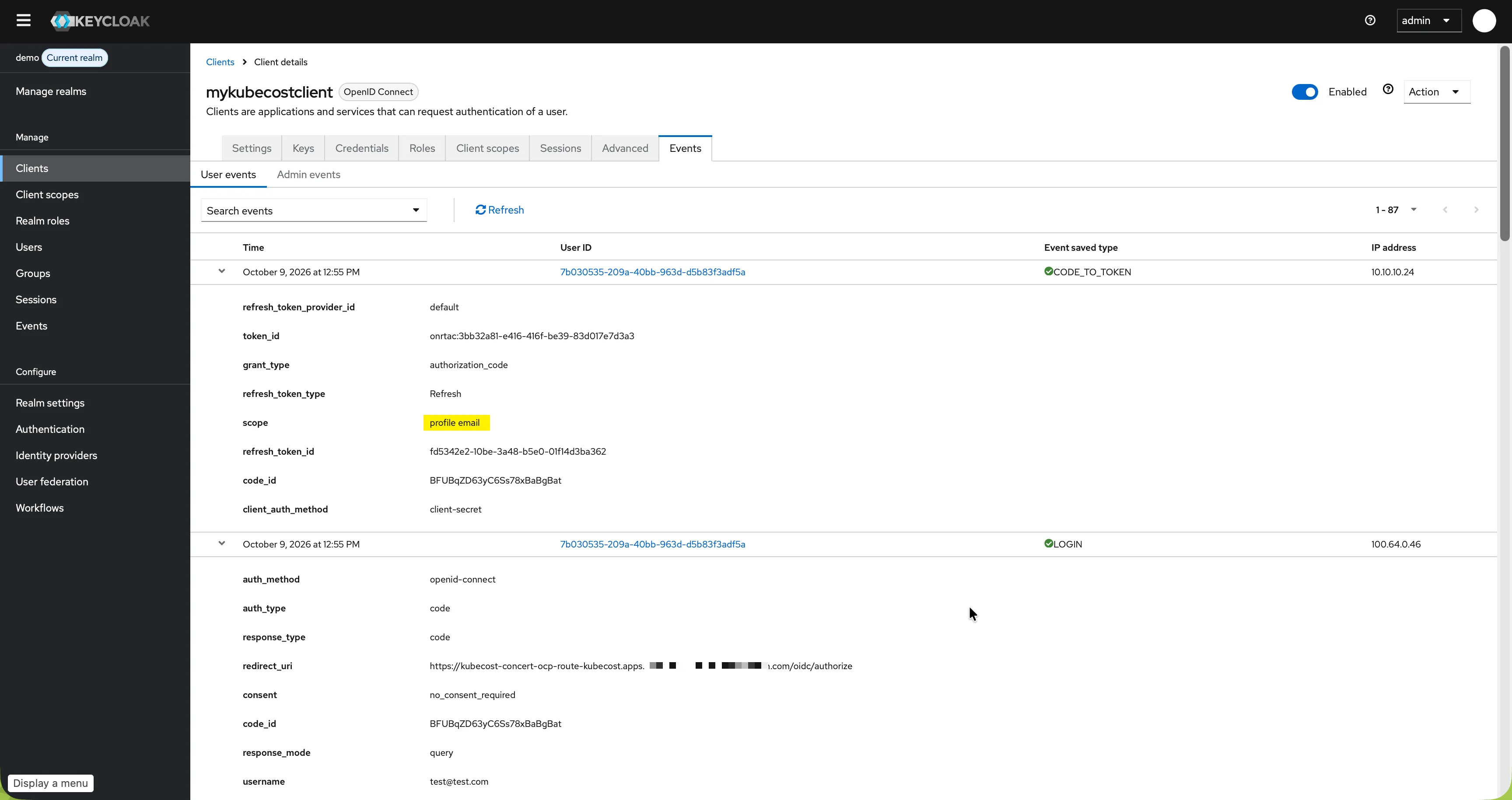
Keycloak recorded a successful token exchange:
CODE_TO_TOKENHowever, the event showed these scopes:
profile emailThe openid scope was missing.
Lesson 3: OAuth 2.0 Is Not Automatically OpenID Connect
This was my first important lesson. OAuth 2.0 and OpenID Connect are related, but they solve different problems:
- OAuth 2.0 is primarily an authorization framework. It issues Access Tokens for accessing protected resources.
- OpenID Connect adds an identity layer on top of OAuth 2.0. It introduces the ID Token and standardized identity claims.
An OpenID Connect authorization request must include:
scope=openidWithout that openid scope, an Access Token is returned, but not an ID Token (OIDC Token). Kubecost expected an ID Token, while Keycloak had not been asked to issue one.
I therefore added the missing scope to the authorization URL:
# Request URL:
# https://KEYCLOAK_HOST/realms/REALM/protocol/openid-connect/auth?client_id=mykubecostclient&response_type=code&redirect_uri=https://KUBECOST_HOST/oidc/authorize&scope=openid

# Query string parameters
client_id:     mykubecostclient
response_type: code
redirect_uri:  https://KUBECOST_HOST/oidc/authorize
scope:         openid
Update: I later realized that adding
scope=openidto theauthURLwas not actually necessary in this setup. The final configuration at the end of this article works without it. Still, the lesson holds for general OIDC troubleshooting: if no ID token is issued, check first whetheropenidis in the requested scopes.
That resolved the first ambiguity and immediately exposed the next problem.
An Unexpected Detour: The Operator Stopped Reconciling
To aid troubleshooting I enabled debug logging for the aggregator component of Kubecost. After a short while I noticed that the Kubecost Custom Resource had entered an Irreconcilable state. The operator reported:
.Values.kubecostAggregator is no longer supported.
Please use .Values.aggregator instead.
The Custom Resource still used:
kubecostAggregator:Kubecost 3.3 expected:
aggregator:This was unrelated to the OIDC protocol, but highly relevant to the investigation. If the operator cannot reconcile the resource, the desired configuration in the Custom Resource may not match the resources currently running in the cluster.
Lesson 4: Verify the Effective Configuration
From that point onward, I treated the configuration loaded by the running Aggregator as the source of truth:
oc exec -it KUBECOST_AGGREGATOR_POD -- \
  cat /var/configs/oidc/oidc.json

{
  "enabled" : true,
  "useIDToken" : false,
  "clientID" : "mykubecostclient",
  "secretName" : "kubecost-oidc-secret",
  "authURL" : "https://KEYCLOAK_HOST/realms/demo/protocol/openid-connect/auth?client_id=mykubecostclient&response_type=code",
  "loginRedirectURL" : "https://KUBECOST_HOST/oidc/authorize",
  "discoveryURL" : "https://KEYCLOAK_HOST/realms/demo/.well-known/openid-configuration",
  "hostedDomain" : "",
  "skipOnlineTokenValidation" : "false",
  "useClientSecretPost": false,
  "rbac" : {
    "enabled" : false,
    "groups" : [
    ]
  }
}
Desired state is not runtime state. When troubleshooting, verify both. The Custom Resource says what you want. The controller decides whether you get it. When reconciliation fails, you can end up debugging a configuration that is not running.
The Login Worked, but the Redirect Loop Continued
After correcting the scope, redirect URI and operator configuration, the Keycloak event log changed to:
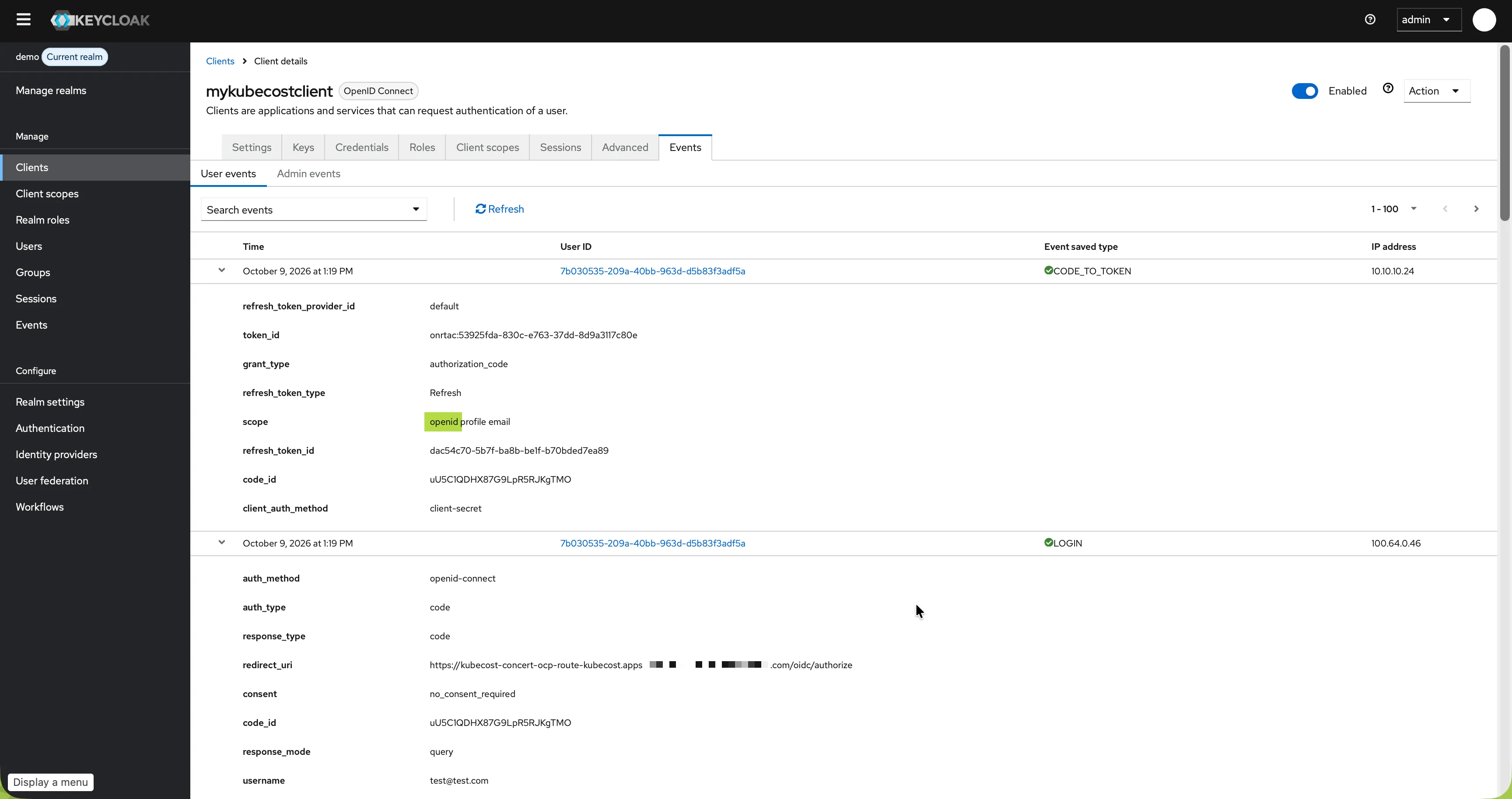
CODE_TO_TOKEN
scope=openid profile email
grant_type=authorization_code
This confirmed that Keycloak was now processing a complete OpenID Connect Authorization Code Flow.
The browser received a redirect to the Kubecost callback:
https://KUBECOST_HOST/oidc/authorize?code=AUTHORIZATION_CODE&session_state=...Kubecost exchanged the code, and the callback response included two cookies:
Set-Cookie: id_token=ID_TOKEN; Path=/; SameSite=Lax
Set-Cookie: token=ACCESS_TOKEN; Path=/; SameSite=Lax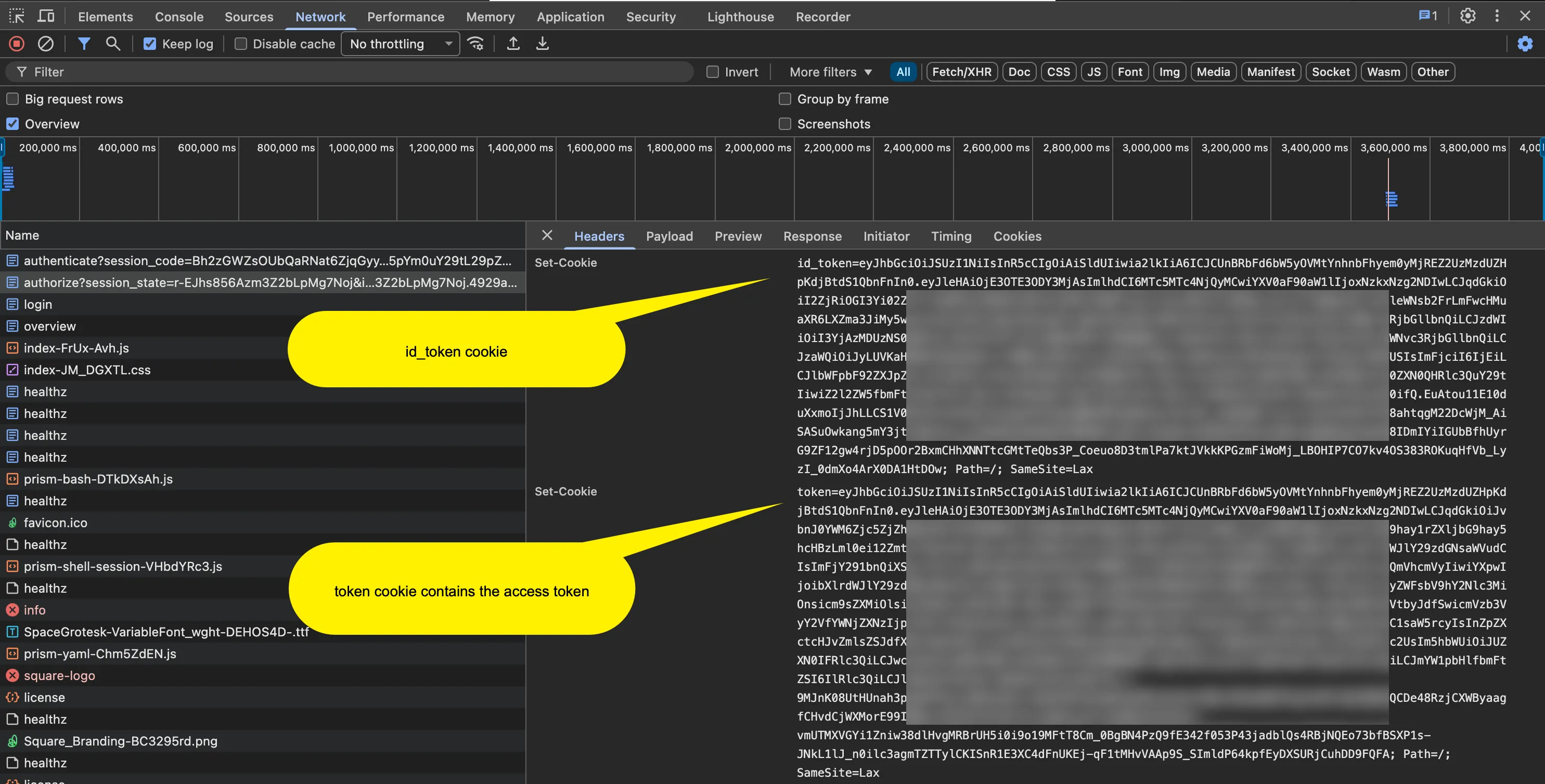
At this point, several facts were established:
- Keycloak authenticated the user.
- Keycloak issued an authorization code.
- Kubecost exchanged the code successfully.
- An ID Token and an Access Token existed.
- Kubecost returned both tokens as cookies.
The configuration looked correct. It wasn’t enough.
oidc:
    authURL: 'https://KEYCLOAK_HOST/realms/demo/protocol/openid-connect/auth?client_id=mykubecostclient&response_type=code&redirect_uri=https://KUBECOST_HOST/oidc/authorize&scope=openid'
    clientID: mykubecostclient
    clientSecret: <CLIENT_SECRET>
    discoveryURL: 'https://KEYCLOAK_HOST/realms/demo/.well-known/openid-configuration'
    enabled: true
    loginRedirectURL: 'https://KUBECOST_HOST/oidc/authorize'
Yet the browser still entered a login loop.
Inspecting the network traffic in browser DevTools, the callback response contained both cookies. Two tokens, two cookies, and then Location: /login, which led to Keycloak, which led to the callback, which led back to /login. The browser eventually gave up with “The page isn’t redirecting properly”, and the Aggregator logged:
DBG Login called
DBG Validating OIDC token...
DBG Auth: attempting to fetch token from cookie
DBG Introspection Response: {"active":false}
INF Redirecting to 'https://KEYCLOAK_HOST/realms/demo/protocol/openid-connect/auth?client_id=mykubecostclient&response_type=code&redirect_uri=https://KUBECOST_HOST/oidc/authorize&scope=openid'
...
Introspection Response: {"active":false}
A redirect to /login can be the consequence of a failed validation decision. The header showed the loop, not why the application entered it.
Error 4: Issuing a Token Is Not Trusting a Token
This was the most important conceptual lesson from the entire troubleshooting session.
I had implicitly equated “a valid-looking JWT exists” with “the user is authenticated”. Those are different stages, owned by different parties:
Authorization request     ── browser + identity provider (IdP)
Authorization code        ── IdP
Code → token exchange     ── application <-> IdP
Token issuance            ── IdP              ✅ worked
Token validation          ── application      ❌ failed here
Application session       ── application
Lesson 5: Authorization and Token Acceptance Are Separate Decisions
Once the browser delivers the authorization code to the Kubecost callback URL, it no longer takes part in the code exchange. Two backend calls follow that the browser never sees:
- Code exchange: the Kubecost pod calls Keycloak directly to exchange the authorization code for tokens.
- Token introspection: the Kubecost pod asks Keycloak’s introspection endpoint whether the token from the cookie is active.
This matters for troubleshooting. If either call fails, the browser only sees the symptom, a redirect back to /login, not the cause. The cause lives in the Kubecost pod logs and the Keycloak event log, not in the browser DevTools Network panel.
Keycloak’s job ended at issuance, and it had done it correctly. The login had worked, but Kubecost still had to decide whether to trust the token, and it did so based on Keycloak’s introspection answer: {"active":false}.
Error 5: The Root Cause - The Access Token Had the Wrong Audience
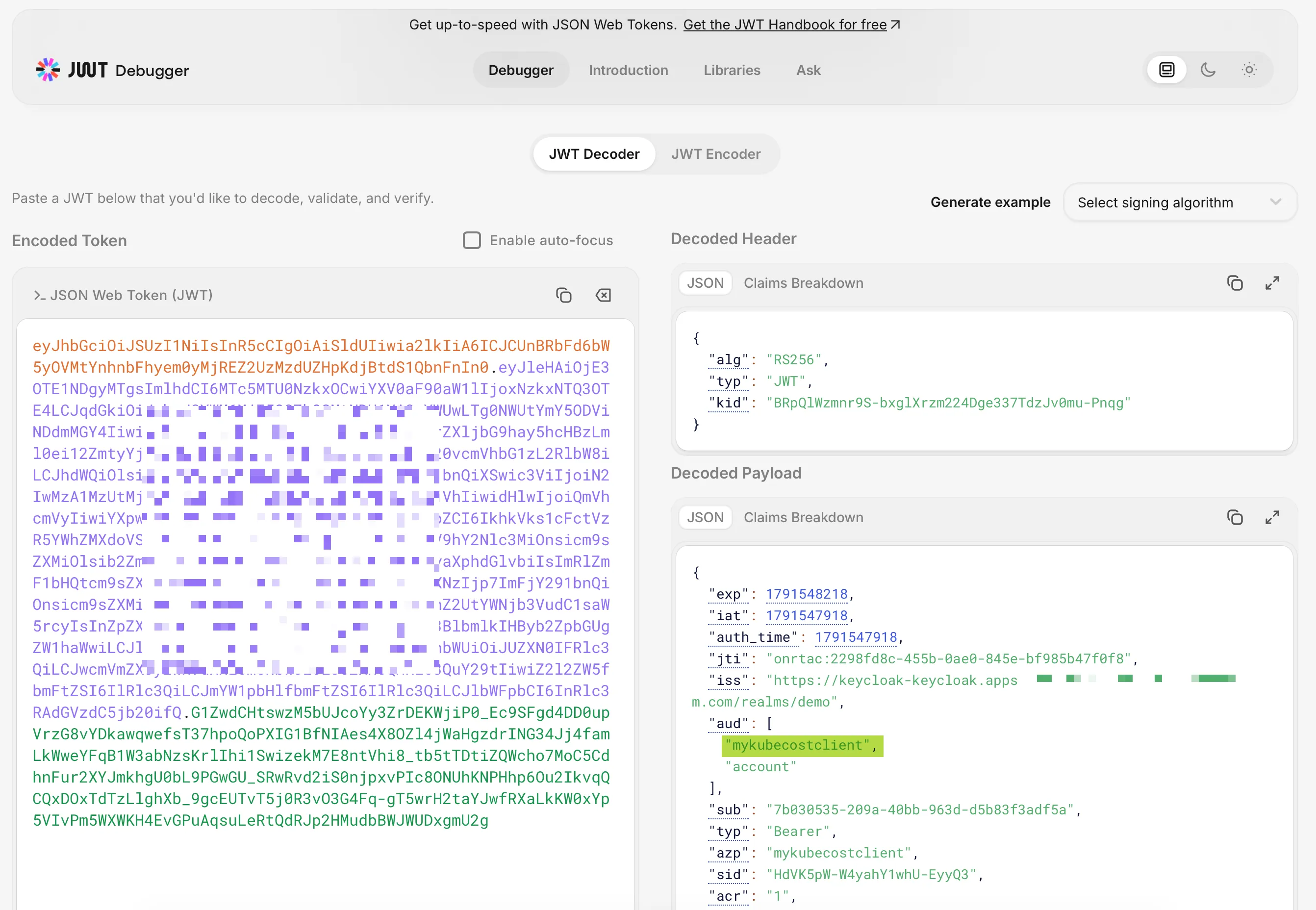
Decoding both JWTs on jwt.io revealed the root cause.
The Access Token contained an audience account:
Access token
{
  "iss": "https://KEYCLOAK_HOST/realms/REALM",
  "aud": "account",
  "azp": "mykubecostclient",
  "typ": "Bearer",
  "scope": "openid profile email"
}
The ID token, by contrast, contained an audience of mykubecostclient:
ID token
{
  "iss": "https://KEYCLOAK_HOST/realms/REALM",
  "aud": "mykubecostclient",
  "azp": "mykubecostclient",
  "typ": "ID"
}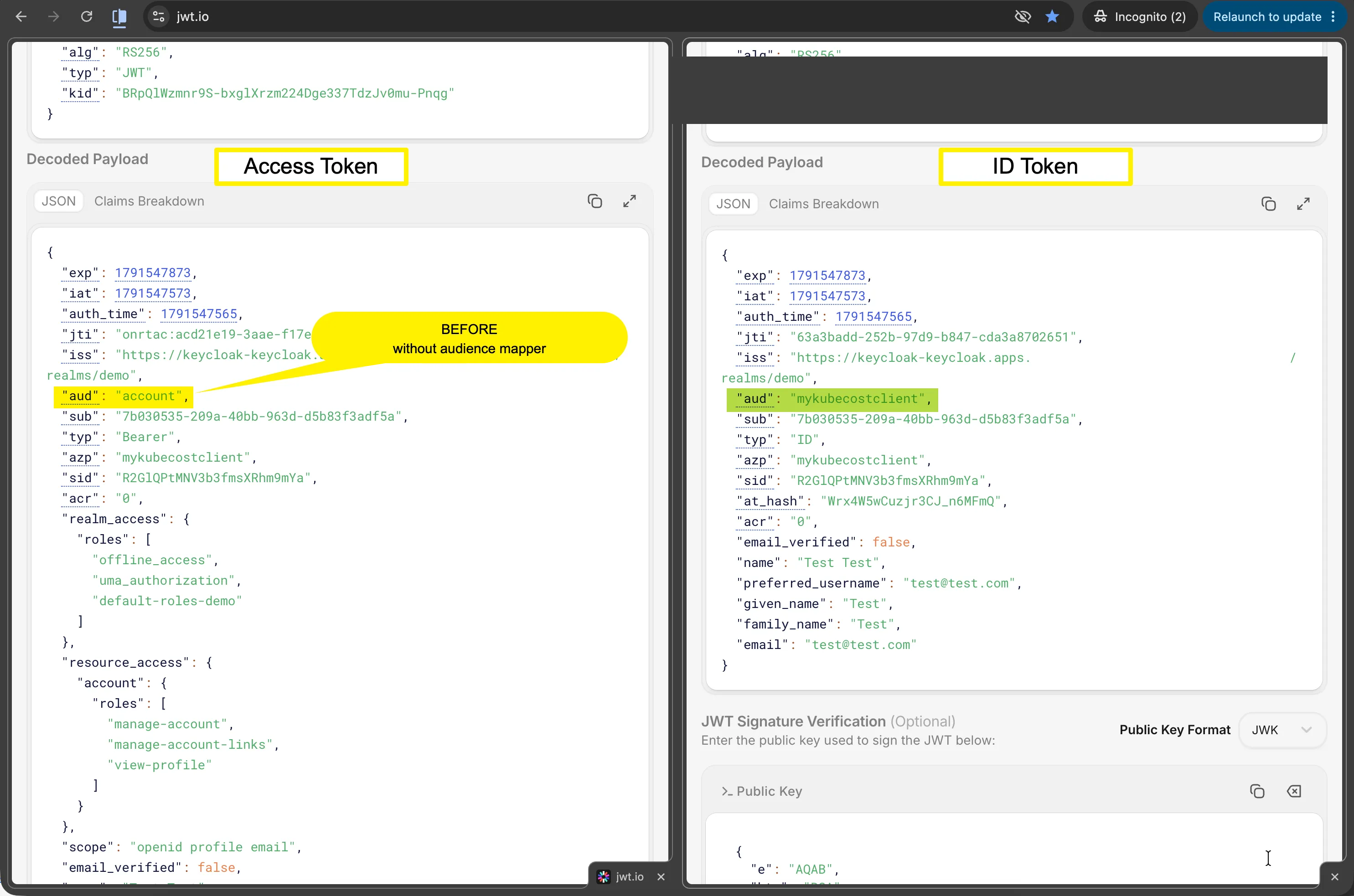
Same issuer, same user, same session, same client (azp). Different audience.
Which token is validated? In this setup, Kubecost validates the access token, not the ID token. That is why the
audclaim of the access token mattered here: Keycloak checks it during introspection, regardless of what theaudof the ID token says.
Lesson 6: A JWT Is Not Simply Valid. It Is Valid for an Audience
The aud claim names the intended recipient. It can be a string or an array. A correctly signed, unexpired token issued for service A should not be accepted by service B; that is the point of the claim. The azp claim identifies the authorized party, and seeing the client there is not a substitute for an audience check.
Here the ID token was addressed to mykubecostclient, but the access token was addressed to account, Keycloak’s built-in account service, not to mykubecostclient.
It also turned audience claims from an abstract JWT concept into a practical troubleshooting signal.
Before and After the Audience Mapper
Once the Audience Mapper was configured, the access token changed. The aud claim went from a single string to an array:
Access token — before the Audience Mapper:
{
  "aud": "account",
  "azp": "mykubecostclient"
}
Access token — after the Audience Mapper:
{
  "aud": [
    "mykubecostclient",
    "account"
  ],
  "azp": "mykubecostclient"
}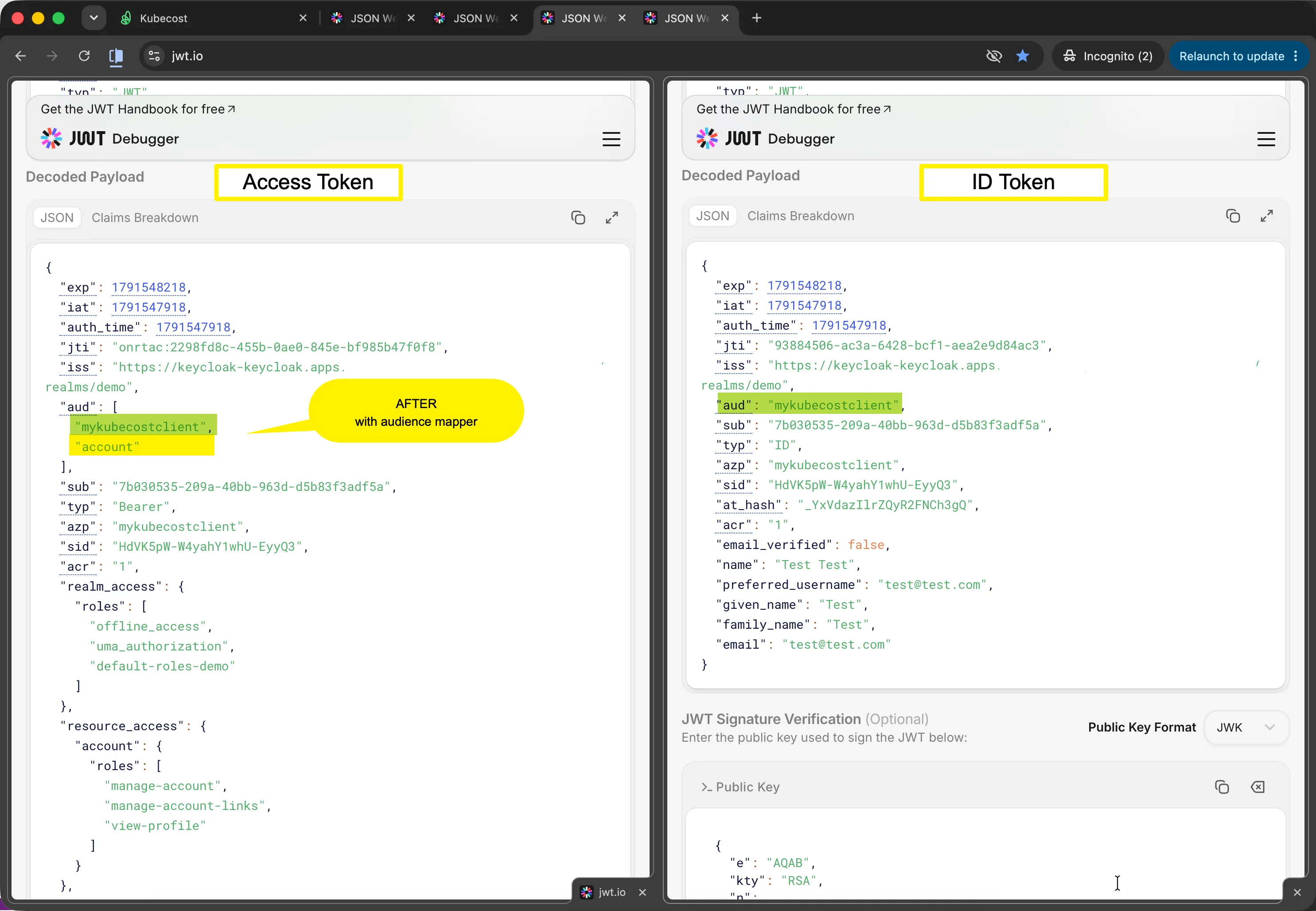
Both forms are valid per the JWT spec (RFC 7519) — aud can be a single string or a JSON array of strings. In this environment, the original Access Token contained aud: "account". After adding the Audience Mapper, the audience contained both mykubecostclient and account. Once mykubecostclient is present in the array, Keycloak’s introspection endpoint can confirm the token was intended for that client and returns "active": true.
And that was it. With the Audience Mapper in place, Kubecost opened, the login loop was gone, and everything worked with online token validation switched on again. The problem was solved, and this is where the main story ends.
What follows is the extra material: how to configure the Audience mapper, how I actually found the cause, a troubleshooting checklist and some closing words.
How to Configure the Audience Mapper
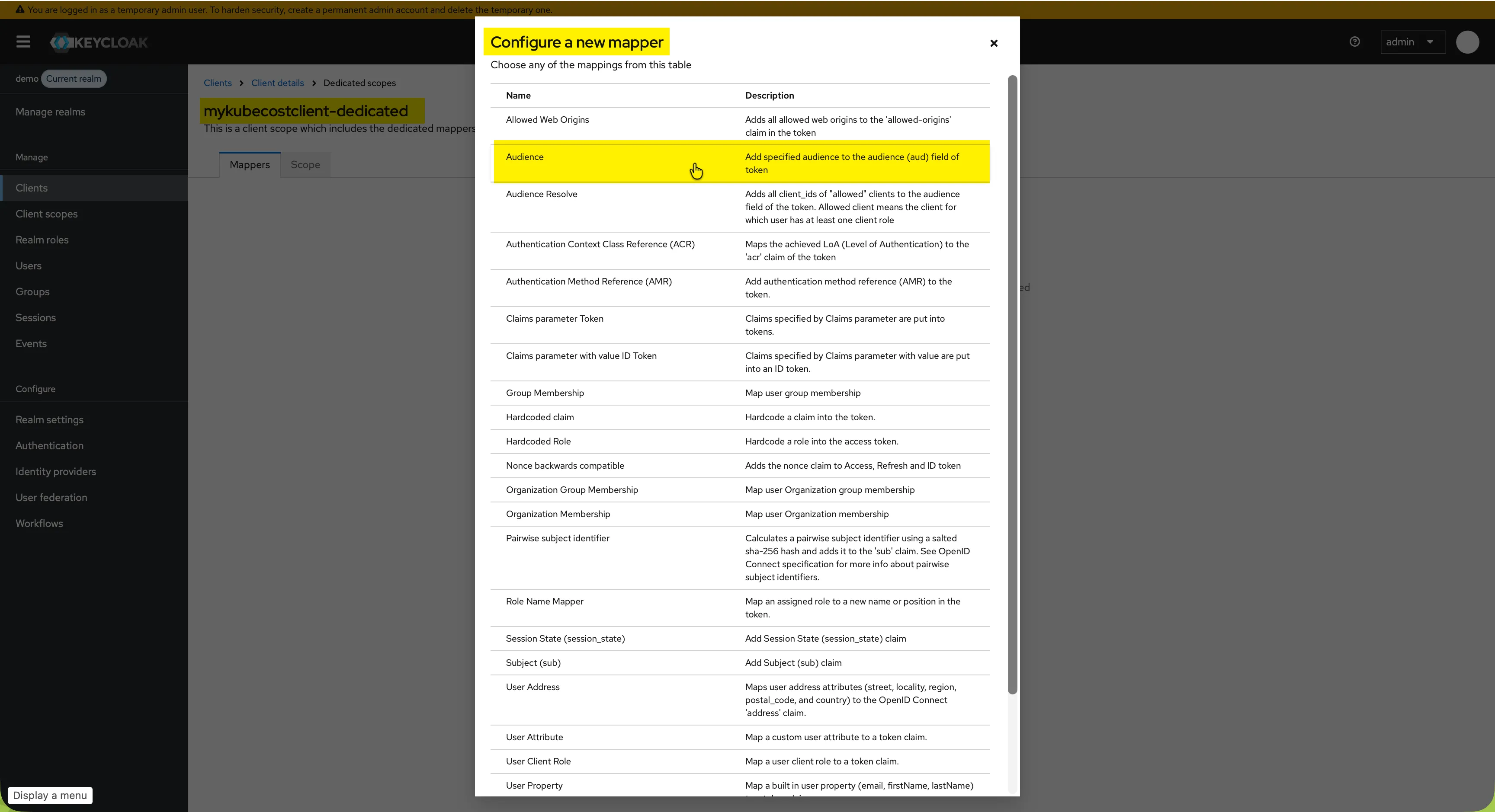
In the Keycloak admin console, open Clients → mykubecostclient → Client scopes → mykubecostclient-dedicated → Mappers, and choose Configure a new mapper. From the list, select Audience:
On the mapper details page, set:
- Name: any name, here
mykubecostaudiencemapper - Included Client Audience:
mykubecostclient - Add to access token: On
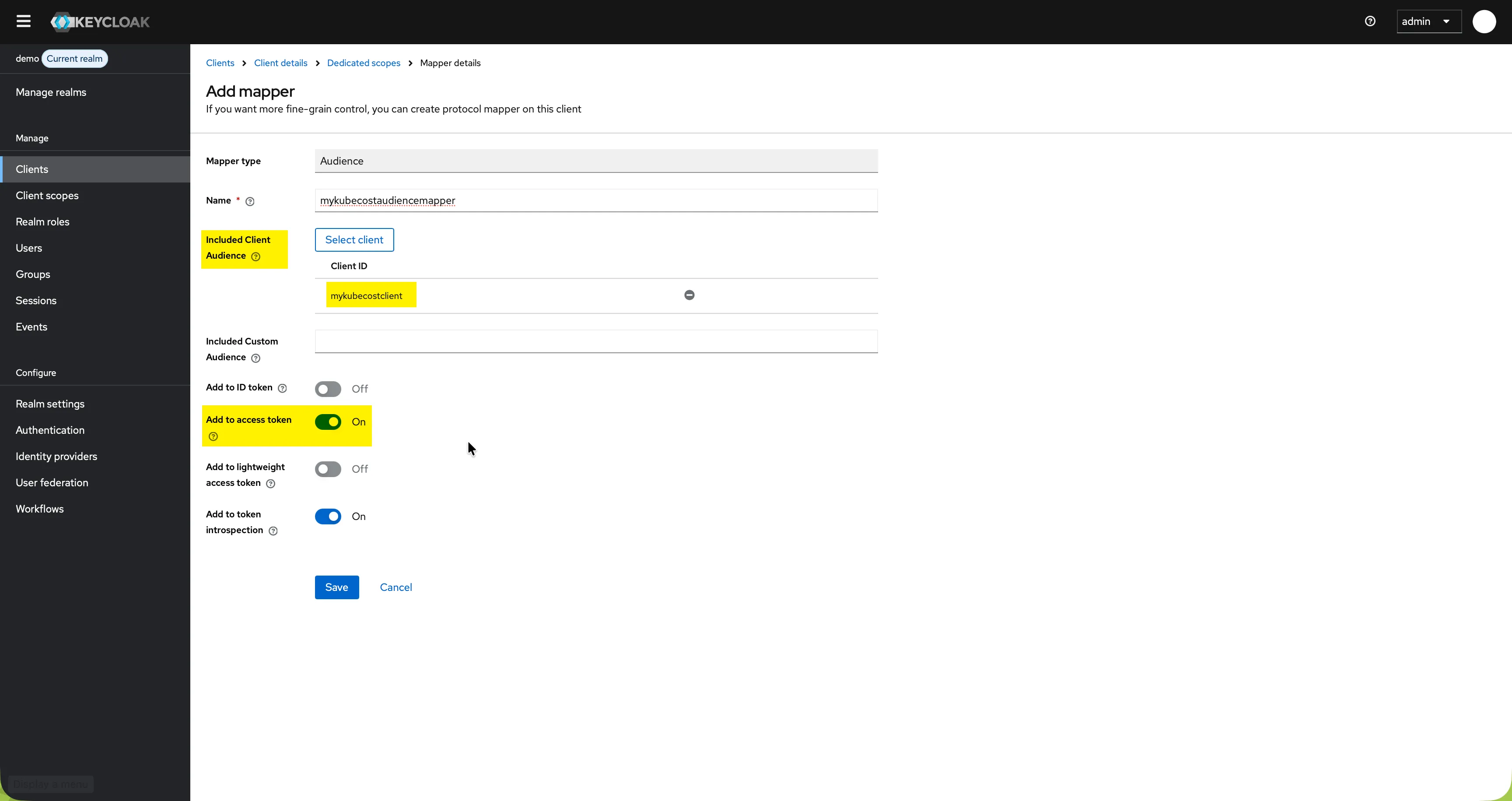
Click Save. The next access token issued for the client will contain mykubecostclient in its aud claim.
How I Actually Found the Root Cause
The audience mapper looks like the obvious fix by now. It wasn’t obvious to me. At the time I only had a general understanding of audience claims, not a deep one. I did not know what they are used for or how important they are. So I had two tokens with different audiences, but I did not know that this was the problem. What I had was a login loop I could not explain.
Using skipOnlineTokenValidation as a Diagnostic Test
What narrowed it down was a setting I changed almost by accident:
skipOnlineTokenValidation: true # was: falseIt was a surprise that this worked. The setting restarted the Kubecost pods, so I had to log in again. Kubecost’s UI then opened immediately. No loop, no errors. I did not know that Kubecost could validate tokens online or locally, or what the setting really changed. I only knew that it made the difference.
The IBM Support Case
I did not want to accept this as the answer. My Keycloak instance was running fine, and IBM’s documentation warns against setting skipOnlineTokenValidation to true. I wanted to understand the root cause, so I opened a support case with IBM.
That turned out to be a very good experience. The support engineer reproduced the issue, traced it to the access token’s aud claim, and explained how he found it and what he changed. I shared this feedback with IBM, and an update to the public Kubecost Keycloak configuration guide is on its way. Until it is published, I have documented the Audience Mapper configuration and troubleshooting process below.
His finding was the one the previous sections describe: Keycloak had issued the access token with aud: account, not mykubecostclient. Kubecost sent that token to the introspection endpoint as client mykubecostclient, and Keycloak returned "active": false because mykubecostclient was not in the token’s aud claim — the token had been issued for account, not for Kubecost’s client. The fix was an Audience Mapper that adds mykubecostclient to the access token’s aud claim. After that, introspection returned "active": true and skipOnlineTokenValidation went back to false.
Verifying the Tokens Manually
Capture a fresh Access Token from the Authorization Code Flow you are testing and submit that token directly to Keycloak’s introspection endpoint.
TOKEN=<YOUR-ACCESS-TOKEN>

echo "$TOKEN" | cut -d. -f2 | tr '_-' '/+' | jq -R '@base64d | fromjson | {aud, azp}'

curl -s -X POST \
  "https://KEYCLOAK_HOST/realms/REALM/protocol/openid-connect/token/introspect" \
  -d "client_id=mykubecostclient" \
  -d "client_secret=CLIENT_SECRET" \
  -d "token=$TOKEN" \
  | jq '{active, aud, azp}'
Before the mapper, the introspection call returns "active": false. After it, it returns "active": true and aud contains mykubecostclient.
Final Thoughts: Back to a Clean Configuration
The beauty of this troubleshooting journey is where it leaves us. During the debugging phase, I relied on forcing parameters like redirect_uri and scope=openid into the authURL.
But once I understood the protocol and properly configured the Audience Mapper and exactly one Valid Redirect URI in Keycloak, I realized I could delete all my manual hacks. With a properly configured IdP, this minimal Kubecost custom resource works flawlessly with full online token validation enabled:
oidc:
  enabled: true
  clientID: "mykubecostclient"
  clientSecret: "<CLIENT_SECRET>"
  authURL: "https://KEYCLOAK_HOST/realms/REALM/protocol/openid-connect/auth?client_id=mykubecostclient&response_type=code"
  loginRedirectURL: "https://KUBECOST_HOST/oidc/authorize"
  discoveryURL: "https://KEYCLOAK_HOST/realms/REALM/.well-known/openid-configuration"
  skipOnlineTokenValidation: false
Follow the protocol step by step. Trust observed behavior over assumptions. Then return to the baseline and verify which changes were actually necessary.
In the end the integration worked. But the most valuable result was not the final YAML — it was being able to explain every transition between clicking Log in and establishing an authenticated session, and knowing exactly where to look the next time one of those transitions fails.
OIDC Troubleshooting Checklist for Keycloak
Work through the flow in order. Each step either proves a layer works or tells you where to stop.
1. Verify That the Operator Is Applying the Configuration
oc get kubecost KUBECOST_NAME -n KUBECOST_NAMESPACE \
  -o jsonpath='{range .status.conditions[*]}{.type}{" | "}{.status}{" | "}{.reason}{" | "}{.message}{"\n"}{end}'
Resolve reconciliation errors before drawing conclusions from configuration changes.
2. Inspect the Effective Runtime Configuration
oc exec -n KUBECOST_NAMESPACE KUBECOST_AGGREGATOR_POD -- \
  cat /var/configs/oidc/oidc.json
Verify the exact URLs and validation settings loaded by the process.
3. Verify the Provider Metadata
curl -sk \
  "https://KEYCLOAK_HOST/realms/REALM/.well-known/openid-configuration" | jq
Confirm at least:
issuerauthorization_endpointtoken_endpointintrospection_endpointuserinfo_endpointjwks_uri- supported scopes and signing algorithms
4. Inspect the Authorization Request
The browser request should contain:
client_id
response_type=code
scope=openid
redirect_uri
Do not infer these values from YAML. Verify them in the browser DevTools Network panel.
Browser session hygiene: All Incognito tabs and windows in a single Chrome session share one cookie sandbox — a login in tab A is visible in tab B. Close every Incognito window completely between tests to get a clean state. If a flow is skipping steps you expected to see, a stale session from a previous test is a likely cause.
5. Check the Identity Provider Events
A successful exchange should show an event such as:
CODE_TO_TOKENand the effective scope should include:
openid6. Inspect the Callback Response
Look for:
/oidc/authorize?code=...Then inspect:
- HTTP status
LocationheaderSet-Cookieheaders- errors in the application log at the same timestamp
7. Verify That the Browser Returns the Cookies
Set-Cookie shows what the server asked the browser to store. The next request’s Cookie header shows what the browser actually returned.
8. Identify the Failing Validation Path
As a diagnostic test, compare online validation with local JWT validation. If only local validation succeeds, the evidence points toward the online validation or introspection path rather than the browser, route or initial OIDC exchange.
9. Sanitize Evidence Before Sharing
Remove client secrets, raw JWTs, authorization codes, session cookies and personal claims. A HAR export can contain credentials even when the screenshot next to it looks harmless.
10. Return to the Baseline
After identifying the likely fix, restore the clean configuration, keep only the durable changes, obtain fresh tokens and sessions, and retest. This final step proves which changes were actually necessary and which experiments merely changed the observed behavior.
| Symptom | Most likely layer |
|---|---|
Invalid parameter: redirect_uri |
redirect_uri parameter is missing on the request and/or Keycloak’s Valid Redirect URIs don’t match exactly |
Empty ID token / no JWT ID token found |
scope=openid missing: OAuth flow instead of OIDC |
| Config changes have no effect | Operator not reconciling, or pod not restarted |
Set-Cookie present, but loop back to /login |
Application-side token validation failed although login was successful |
Introspection returns active: false |
Audience, client authentication, token type or expiry |
Frequently Asked Questions
Why does Kubecost keep redirecting to /login after a successful Keycloak login?
The most common cause is token introspection returning {"active": false}. This happens when the access token’s aud (audience) claim does not include the client ID. The fix is to add an Audience Mapper in Keycloak so the client ID appears in the access token’s aud claim.
Why does Keycloak return Invalid parameter: redirect_uri?
Either the redirect_uri parameter is missing from the authorization request, or its value does not exactly match one of the Valid Redirect URIs configured in the Keycloak client. The redirect_uri parameter is mandatory in the authorization request whenever Keycloak cannot determine a unique target unambiguously — that is, when no Valid Redirect URI is configured, when a wildcard is used, or when more than one URI is registered. Configuring exactly one exact URI removes that ambiguity: Keycloak can infer the destination and the parameter becomes optional.
What is the difference between OAuth 2.0 and OpenID Connect?
OAuth 2.0 issues access tokens for authorization. OpenID Connect adds scope=openid and issues an ID token that contains identity claims. If scope=openid is missing from the authorization request, Keycloak runs a pure OAuth 2.0 flow and no ID token is issued — which breaks any OIDC-dependent login.
What does the introspection endpoint returning {"active": false} mean?
The token was issued successfully but fails server-side validation at the introspection endpoint. Common causes are a wrong audience (aud claim), the wrong token type being presented (ID token instead of access token) or an expired token.
Does this OIDC troubleshooting apply to apps other than Kubecost?
Yes. The failure modes — redirect URI mismatches, missing scope=openid, wrong audience in access tokens, and introspection returning active: false — are standard OIDC problems. The Keycloak Audience Mapper fix and the troubleshooting checklist in this article apply to any OIDC client including Grafana, ArgoCD, and Vault.
What is a Keycloak Audience Mapper and why is it needed?
By default, Keycloak does not automatically include your specific client ID in the access token’s aud (audience) claim — instead, it often defaults to internal clients like account. When Kubecost validates an incoming token, it requires the audience to match its registered client ID. Adding an Audience Mapper in Keycloak’s client configuration explicitly injects the Kubecost client ID into the aud claim, ensuring token introspection and authentication succeed.
What is skipOnlineTokenValidation in Kubecost and when should it be used?
skipOnlineTokenValidation: true tells Kubecost to skip the introspection endpoint call and validate the JWT locally instead using only the public key from the JWKS URI. It is useful as a diagnostic step to isolate whether the problem is in the introspection path or elsewhere, but it should be set back to false (the secure default) once the root cause is fixed.